ClearShell
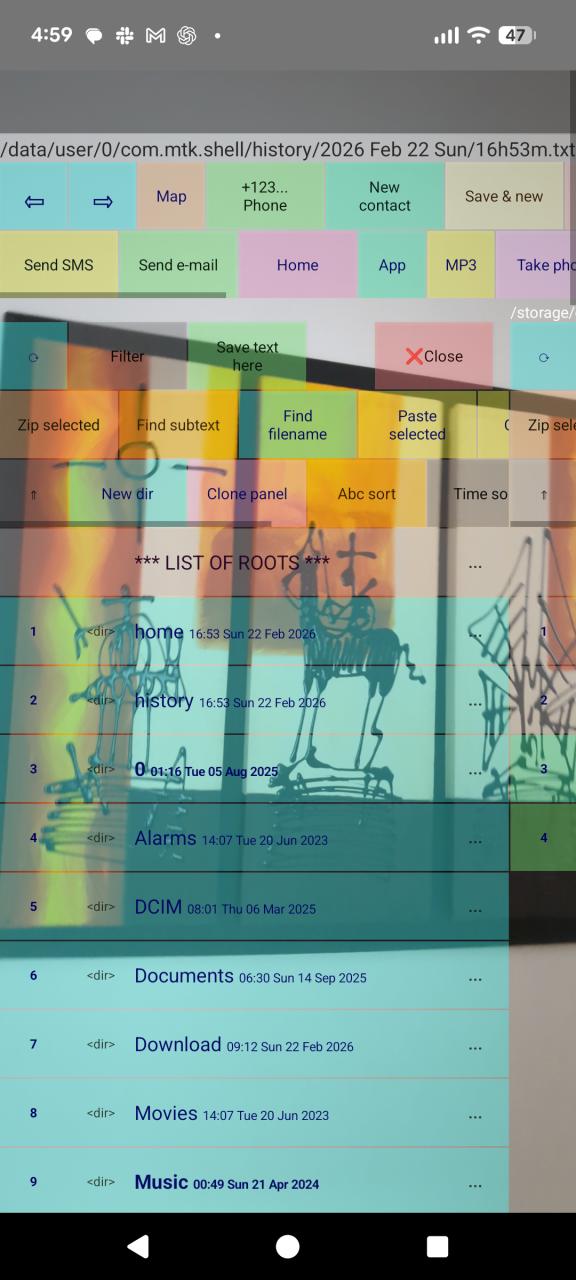
Open it when you need to quickly jot something down. ClearShell is an original, ad-free file manager, address book, FS-focused MP3 player, and notepad for jotting down short notes, creating new contacts, and sending emails. It's also a unique, high-precision calculator that remembers variables and allows you to perform calculations with comments. Camera and location buttons are always within reach. You can group application icons in the file system, launch them, and execute Linux commands.
Standard version
Without notification tracking. This version installs directly from the browser.
Install ClearShell.apkClearShell with notification log
This optional build can read and keep a private local log of notifications after you explicitly enable Notification access in Android settings. The main download button above is the standard build without this feature.
SHA-256:
b1845e843f0a0a07217aabe923941237aaa65a076561c83ee9276f493f92cc44
This exact APK was uploaded to and scanned by VirusTotal.
If Play Protect blocks installation from the browser, download the APK to a desktop computer and install it with Android Debug Bridge (ADB). The -r option updates ClearShell while retaining its application data.
Before installing
- Install Android SDK Platform Tools or Android Studio on the computer.
- On the phone, enable Developer options and then USB debugging.
- Connect the phone and accept its RSA debugging prompt.
- Run
adb devicesand make sure the device is listed asdevice, notunauthorized.
Windows PowerShell (default Android SDK location)
& "$env:LOCALAPPDATA\Android\Sdk\platform-tools\adb.exe" install -r "PATH_TO_APK\ClearShell.apk"Windows Command Prompt
"%LOCALAPPDATA%\Android\Sdk\platform-tools\adb.exe" install -r "C:\path\to\ClearShell.apk"Any system where ADB is in PATH
adb install -r "/path/to/ClearShell.apk"More ADB command variants
macOS default Android SDK location
"$HOME/Library/Android/sdk/platform-tools/adb" install -r "/path/to/ClearShell.apk"Linux default Android SDK location
"$HOME/Android/Sdk/platform-tools/adb" install -r "/path/to/ClearShell.apk"Choose one device when several are connected
adb devices
adb -s DEVICE_SERIAL install -r "/path/to/ClearShell.apk"
Wireless debugging (Android 11 or newer)
adb pair PHONE_IP:PAIRING_PORT
adb connect PHONE_IP:DEBUG_PORT
adb install -r "/path/to/ClearShell.apk"
Install and grant eligible runtime permissions
adb install -r -g "/path/to/ClearShell.apk"-g grants eligible runtime permissions such as Camera or Contacts. Android still requires special access—including Notification access and All files access—to be enabled manually in system settings.
Fallback for an ADB streaming error
adb install --no-streaming -r "/path/to/ClearShell.apk"